RTC Development Guide_Rev1.4
Revision History
Version |
Date |
Author |
Revision Content |
|---|---|---|---|
Rev1.0 |
23-09-19 |
LJZ |
Initial document creation |
Rev1.1 |
24-03-25 |
sxx |
Changed document name |
Rev1.2 |
25-04-18 |
ZH |
Added common issues section |
Rev1.3 |
25-05-14 |
LJZ |
1. Optimized document format |
Rev1.4 |
26-01-27 |
LJZ |
Added new interface Liot_GetTimestamp() |
1 Introduction
This document introduces the LTE-EC71X RTC interface APIs. The API interfaces are declared in the file components/kernel/lierda_api/liot_rtc/liot_rtc.h.
2 API Function Overview
Function |
Description |
|---|---|
|
Set RTC time |
|
Get RTC time |
|
Get RTC time converted to seconds |
|
Get local RTC time |
|
Set timezone, in units of 15 minutes |
|
Get timezone, in units of 15 minutes |
|
Print RTC time |
|
Set RTC alarm time |
|
Get RTC alarm time |
|
Enable and disable RTC alarm |
|
Register RTC alarm callback function |
|
Get RTC time converted to milliseconds |
3 Type Descriptions
3.1 liot_errcode_rtc_e
RTC API execution result error codes.
Definition
typedef enum
{
    LIOT_RTC_SUCCESS = LIOT_SUCCESS,

    LIOT_RTC_INVALID_PARAM_ERR = 1 | LIOT_RTC_ERRCODE_BASE,
    LIOT_RTC_SET_TIME_ERROR,
    LIOT_RTC_GET_TIME_ERROR,
    LIOT_RTC_SET_CB_ERR,
    LIOT_RTC_ENABLE_ALARM_ERR,
    LIOT_RTC_REMOVE_ALARM_ERR,
    LIOT_RTC_GET_FUNC_ERR,
} liot_errcode_rtc_e;
Parameters
LIOT_RTC_SUCCESS: Function executed successfully.
LIOT_RTC_INVALID_PARAM_ERR: Invalid input parameter.
LIOT_RTC_SET_TIME_ERROR: Error setting RTC time.
LIOT_RTC_GET_TIME_ERROR: Error getting RTC time.
LIOT_RTC_SET_CB_ERR: Error registering callback function.
LIOT_RTC_ENABLE_ALARM_ERR: Error enabling alarm.
LIOT_RTC_REMOVE_ALARM_ERR: Error removing alarm.
LIOT_RTC_GET_FUNC_ERR: RTC API function not recognized.
3.2 liot_rtc_time_s
RTC time structure is defined as follows:
Definition
typedef struct liot_rtc_time_struct
{
    int tm_sec;  // seconds [0,59]
    int tm_min;  // minutes [0,59]
    int tm_hour; // hour [0,23]
    int tm_mday; // day of month [1,31]
    int tm_mon;  // month of year [1,12]
    int tm_year; // year [2000-2100]
    int tm_wday; // wday [0-6],sunday = 0,this value has no effect when setting the time
} liot_rtc_time_s;
Parameters
Type |
Parameter |
Description |
|---|---|---|
int |
tm_sec |
Seconds. Range: 0 ~ 59. |
int |
tm_min |
Minutes. Range: 0 ~ 59. |
int |
tm_hour |
Hour. Range: 0 ~ 23. |
int |
tm_mday |
Day. Range: 1 ~ 31. |
int |
tm_mon |
Month. Range: 1 ~ 12. |
int |
tm_year |
Year. Range: 2000 ~ 2100. |
int |
tm_wday |
Day of the week. Range: 0 ~ 6, 0 is Sunday. |
4 API Function Details
4.1 liot_rtc_set_time
This function is used to set RTC time.
Declaration
liot_errcode_rtc_e liot_rtc_set_time(liot_rtc_time_s *tm);
Parameters
tm: [In] Time structure.
Return Value
liot_errcode_rtc_e: Execution result code, see 3.1 for reference.
4.2 liot_rtc_get_time
This function is used to get RTC time.
Declaration
liot_errcode_rtc_e liot_rtc_get_time(liot_rtc_time_s *tm);
Parameters
tm: [Out] Time structure.
Return Value
liot_errcode_rtc_e: Execution result code, see 3.1 for reference.
4.3 liot_rtc_get_time_s
This function is used to convert the obtained RTC time to seconds. The time base starts from January 1, 1970 00:00:00 UTC.
Declaration
INT32 liot_rtc_get_time_s(void);
Return Value
INT32: RTC time converted to seconds.
4.4 liot_rtc_get_localtime
This function is used to get local RTC time. For example, if currently in East 8 timezone, using this interface will return the time after timezone offset calculation.
Declaration
liot_errcode_rtc_e liot_rtc_get_localtime(liot_rtc_time_s *tm);
Parameters
tm: [Out] Time structure.
Return Value
liot_errcode_rtc_e: Execution result code, see 3.1 for reference.
4.5 liot_rtc_set_timezone
This function is used to set timezone.
Declaration
liot_errcode_rtc_e liot_rtc_set_timezone(int timezone);
Parameters
timezone: [In] Set timezone, timezone parameter range: [-48, +56]. In units of 15 minutes, for example: timezone 8 (East 8) corresponds to the value 8 x 4 = 32.
Return Value
liot_errcode_rtc_e: Execution result code, see 3.1 for reference.
4.6 liot_rtc_get_timezone
This function is used to get timezone.
Declaration
liot_errcode_rtc_e liot_rtc_get_timezone(int *timezone);
Parameters
timezone: [Out] Timezone value, range: [-48, +56]. In units of 15 minutes, for example: timezone 8 (East 8) corresponds to the value 8 x 4 = 32.
Return Value
liot_errcode_rtc_e: Execution result code, see 3.1 for reference.
4.7 liot_rtc_print_time
This function is used to print RTC time to log port.
Declaration
liot_errcode_rtc_e liot_rtc_print_time(liot_rtc_time_s tm);
Parameters
tm: [In] Time structure.
Return Value
liot_errcode_rtc_e: Execution result code, see 3.1 for reference.
4.8 liot_rtc_set_alarm
This function is used to set RTC alarm time. Currently, only one alarm can be set and the alarm time is not saved after power loss. If you need to wake up periodically in low-power mode, please refer to low-power-mode.md and use the liot_deepslp_timer series interfaces.
Declaration
liot_errcode_rtc_e liot_rtc_set_alarm(liot_rtc_time_s *tm);
Parameters
tm: [In] Time structure.
Return Value
liot_errcode_rtc_e: Execution result code, see 3.1 for reference.
4.9 liot_rtc_get_alarm
This function is used to get RTC alarm time. The current time is not saved after power loss.
Declaration
liot_errcode_rtc_e liot_rtc_get_alarm(liot_rtc_time_s *tm);
Parameters
tm: [Out] Time structure.
Return Value
liot_errcode_rtc_e: Execution result code, see 3.1 for reference.
4.10 liot_rtc_enable_alarm
This function is used to enable and disable RTC alarm. Before enabling the alarm, you need to set the time through liot_rtc_set_alarm and register the callback through liot_rtc_register_cb for when the time is reached.
Declaration
liot_errcode_rtc_e liot_rtc_enable_alarm(unsigned char on_off);
Parameters
on_off: [In] Switch, values 1 and 0, 1 means enable, 0 means disable.
Return Value
liot_errcode_rtc_e: Execution result code, see 3.1 for reference.
4.11 liot_rtc_register_cb
This function is used to register RTC alarm callback function.
Declaration
liot_errcode_rtc_e liot_rtc_register_cb(liot_rtc_cb cb);
Parameters
cb: [In] Alarm callback function. liot_rtc_cb definition: typedef void (*liot_rtc_cb)(void);
Return Value
liot_errcode_rtc_e: Execution result code, see 3.1 for reference.
4.12 Liot_GetTimestamp
This function is used to convert the obtained RTC time to milliseconds.
Declaration
INT32 Liot_GetTimestamp(uint64_t *timestamp);
Parameters
timestamp: [Out] RTC time converted to milliseconds.
Return Value
INT32: 0 success, -1 parameter error.
5 Code Example
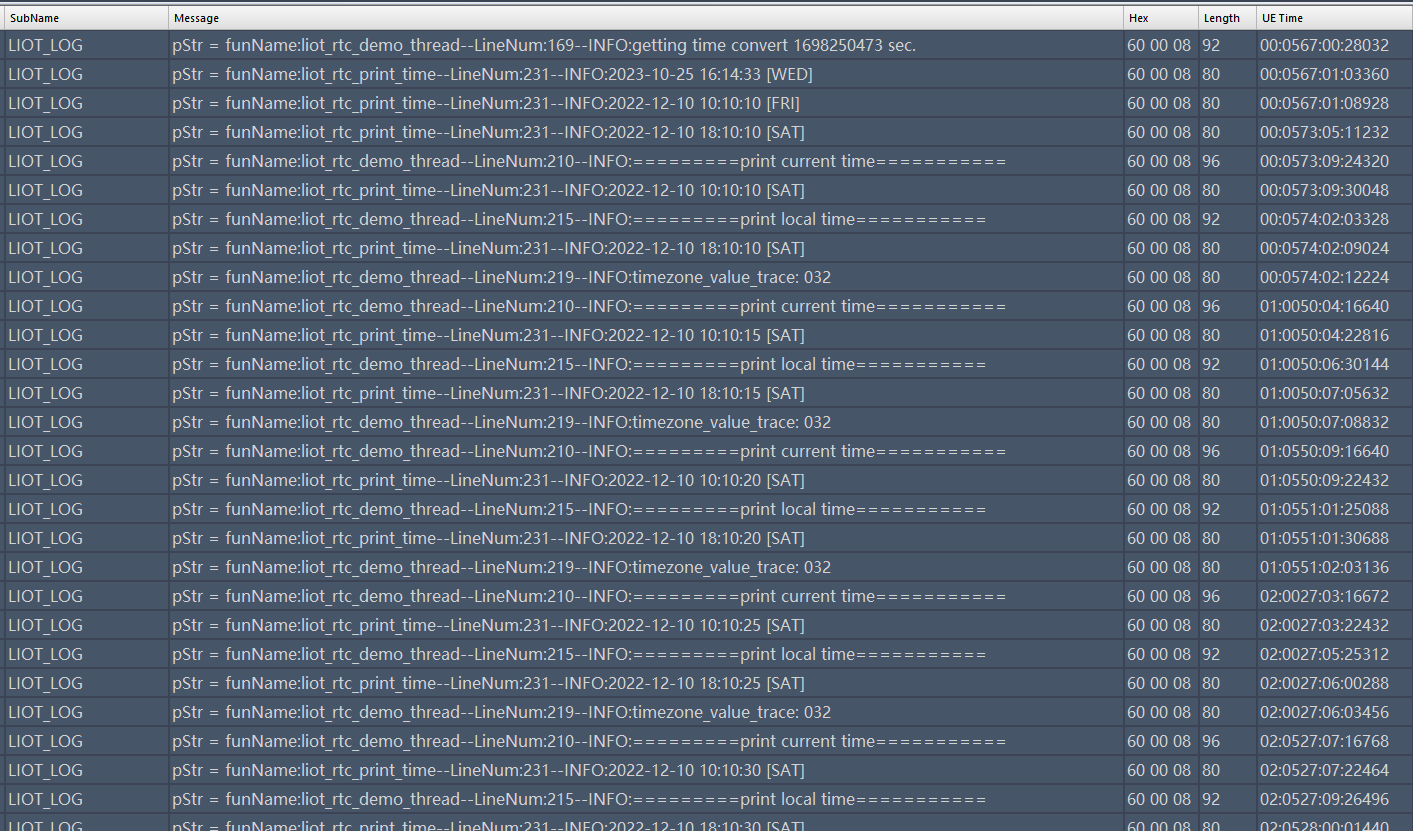
Refer to the examples/demo/src/demo_rtc.c file for sample code. The following execution result indicates that all information was obtained normally:
6 Common Issues
6.1 What is the Accuracy of EC718 32K Clock?
When only the internal RTC is working, without calibration, the error is relatively large, approximately a few minutes over 24 hours. The 32K RTC needs calibration. To obtain accurate time, synchronization with the network is required. You can enable base station time synchronization function through liot_nw_set_ctzu_switch or actively synchronize time using liot_ntp_sync.
6.2 Alarm Support in Low Power Mode
Currently, alarm wakeup is not supported in low power modes (such as PSM, HIBERNATE). If you need to wake up periodically in low power mode, please refer to low-power-mode.md and use the liot_deepslp_timer series interfaces.