Lierda Open Source Introduction_Rev1.0
Document Revision History
Version |
Date |
Author |
Reviewer |
Description |
|---|---|---|---|---|
Rev1.0 |
2026-01-29 |
sxx |
zlc |
Document created |
1 Introduction
This document is intended to guide developers to quickly get familiar with the base-package-separated SDK development workflow, helping users understand the various functional modules of the SDK and start their own development work.
GitHub Repository / Gitee Repository
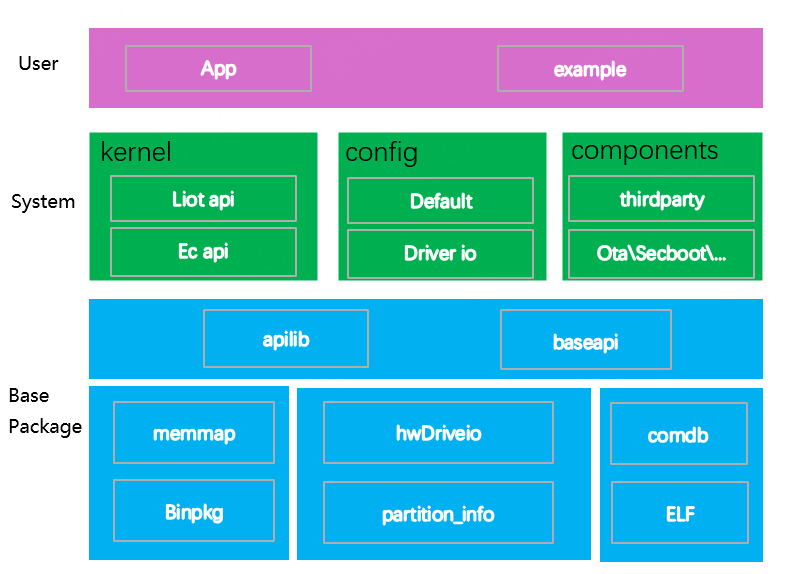
The SDK architecture can be divided into three layers: Base Package Layer, System Layer, and User Layer.
Base Package Layer: The base package layer is not visible to users and is maintained by Lierda. Libraries for specific models are packaged into directories and placed under
components/basePkg/. Developers simply select the base package corresponding to their hardware model during compilation. Refer to Section 3.1.1 below for the mapping.System Layer: The system layer runs the core code of the base-package-separated architecture. It is the entry point for the system loading process, including kernel, configuration, drivers, open-source third-party libraries, TTS, OTA upgrades, etc.
User Layer: The user layer is where developers write their own code, primarily located in the
examplesdirectory. Lierda provides two preset projects: app and demo. The app project is an empty project without specific functionality — users can develop their own code based on it. The demo project provides API interface examples for reference. Customers can also create their own projects underexamples/by referencing the app project. The code entry point isvoid user_main(void), which is automatically called after the system layer starts.
2 Directory Structure Overview
├── components (Component library, core code is placed here)
│   ├── basePkg (Base package directory)
│   │     └── F6D_A, F7B_A, F8D_A, K2B_A, ...
│   ├── driver (Open low-level drivers)
│   │     └── lcd, camera, ...
│   ├── kernel
│   │      └── app.ld, core, ecapi, include, lierda_api
│   ├── ota (FOTA related code)
│   ├── precfg (Preset configuration code implementation)
│   ├── secboot (Secure boot verification related code)
│   ├── thirdparty (Open-source third-party source code)
│   │     └── CJSON, freertos, websockets, lwip, mbedtls, etc.
│   ├── tts (TTS related code)
├── config
│      └── default.ini (Preset configuration)
│      └── iodriver.ini (Driver IO pin preset configuration)
├── docs (Documentation)
├── examples
│      └── app (Default project)
│      └── demo (Default demo project)
├── LICENSE, build.bat, Makefile, README.md
├── rules (Makefile build rules)
├── tools (Scripts and tools)
3 Feature Introduction
3.1 Base Package (basePkg)
The base package layer is maintained by Lierda. Multiple base package versions are provided for different module models and feature combinations. Customers select the base package according to their needs. Base packages are placed under components/basePkg/.
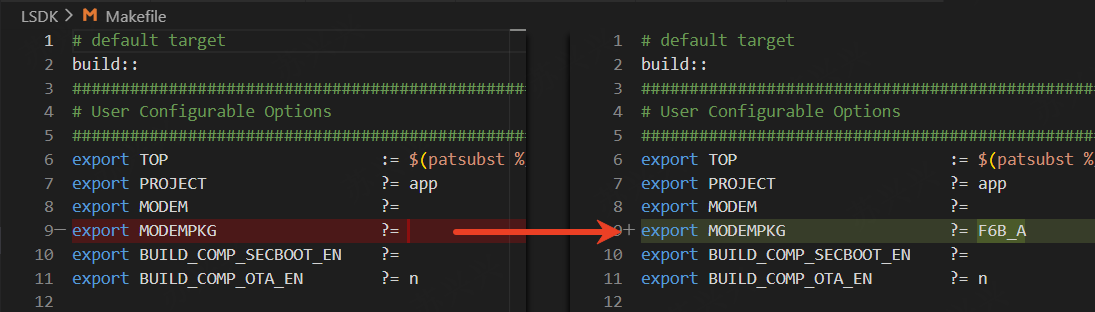
The base package model is configured via MODEMPKG in the root Makefile. As the lowest-level component, all other components are built on top of the base package. Different base packages contain different features and may support different chip models. You need to select the correct base package for your module model. Refer to Section 3.1.1 for the mapping.
3.1.1 Version and Model Mapping
Currently supported versions and models (latest mapping available in rules/Makefile.modem):
Base Package |
Chip |
Compatible Module |
Description |
|---|---|---|---|
F6C_A |
EC718PM |
NT26F6C0 |
C series general version |
F6D_A |
EC718PM |
NT26F6D0, NT26F6D0_EU, NT26F6D0_LA, NT26F6D0_NA |
D series general version |
F6D_B |
EC718PM |
NT26F6D0 |
D series VSIM general version |
F6D_GL |
EC718PM |
NT26F6D0_GL |
D series global version |
F6D_GL_B |
EC718PM |
NT26F6D0_GL |
D series VSIM global version |
F8D_A |
EC718UM |
NT26F8D0 |
D series with 8 MB Flash |
F9D_B |
EC718HM |
NT26F9D0 |
D9 series VSIM general version |
K2B_A |
EC716E |
NT26K2B1, NT26K2B3 |
B series, no full OTA support |
K2E_A |
EC716E |
NT26K2E0, NT26K2E0_0G, NT26K2E1_0G |
E series, no full OTA support |
3.1.2 Base Package File Description
lib: API dynamic library. After compilation, memory usage is in user space. This is the concrete implementation of APIs provided by the base package to upper layers.
ap_lierda_app.elf: Used for parsing dump data when a crash dump is captured.
ap_bootloader.bin: Bootloader executable bin file.
ap_lierda_app.bin: Base package AP-side executable bin file.
cp-demo-flash.bin: Base package CP-side executable bin file.
comdb.txt: Log library, used with the EPAT tool for log capture.
hwDriveio.def: Default IO pin configuration table for drivers in the base package (for reference only, not involved in compilation).
mem_map.txt: Base package macro definition overview, used for generating combined packages.
partition_info.txt: Base package FLASH partition layout table.
3.2 Preset Configuration (Config)
The preset configuration (config) allows you to directly preset parameter values that are saved across power cycles, without needing to call additional APIs. It also allows presetting IO pins for peripheral drivers.
default.ini and iodriver.ini are ultimately converted into macro controls via tools, generating tables in components/precfg/ that are passed to the base package and take effect during system loading.
Note: Only takes effect on the first boot after a full-erase flash. After that, values only change through API modifications and are saved across power cycles.
3.2.1 default.ini
Config/default.ini provides methods to configure default values. Refer to the Chinese documentation for the full configuration table.
3.2.2 iodriver.ini
Config/iodriver.ini provides methods to configure driver IO pins, supporting pin configuration for peripherals such as UART, I2C, SPI, CSPI, I2S, etc.
4 Examples Projects
Users add their own projects in examples. Each subdirectory under examples corresponds to a project.
Modify the root Makefile and set PROJECT to the corresponding project directory name. During compilation, it will automatically link to examples/$(PROJECT)/Makefile, which manages the code in the PROJECT.
The entry function for each PROJECT is fixed: void user_main(void). Users implement the user_main function and develop their own code based on this interface.
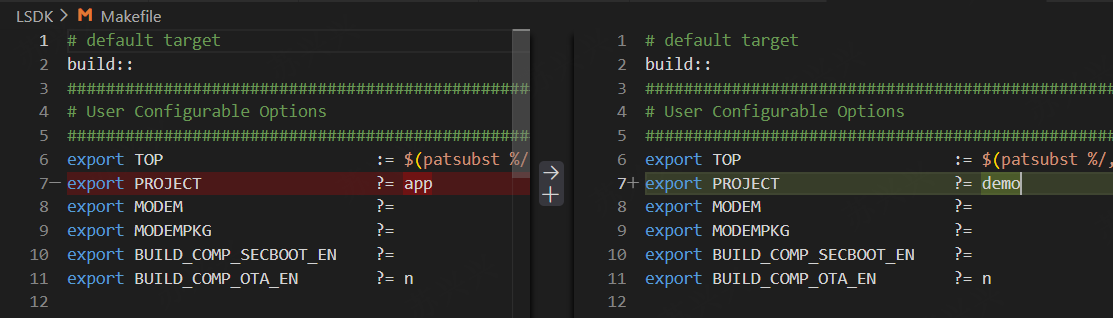
The SDK provides two basic projects: app and demo. The app project is an empty project where customers can develop based on it. The demo project is an API example project with rich example code scenarios for reference.
4.1 app Project
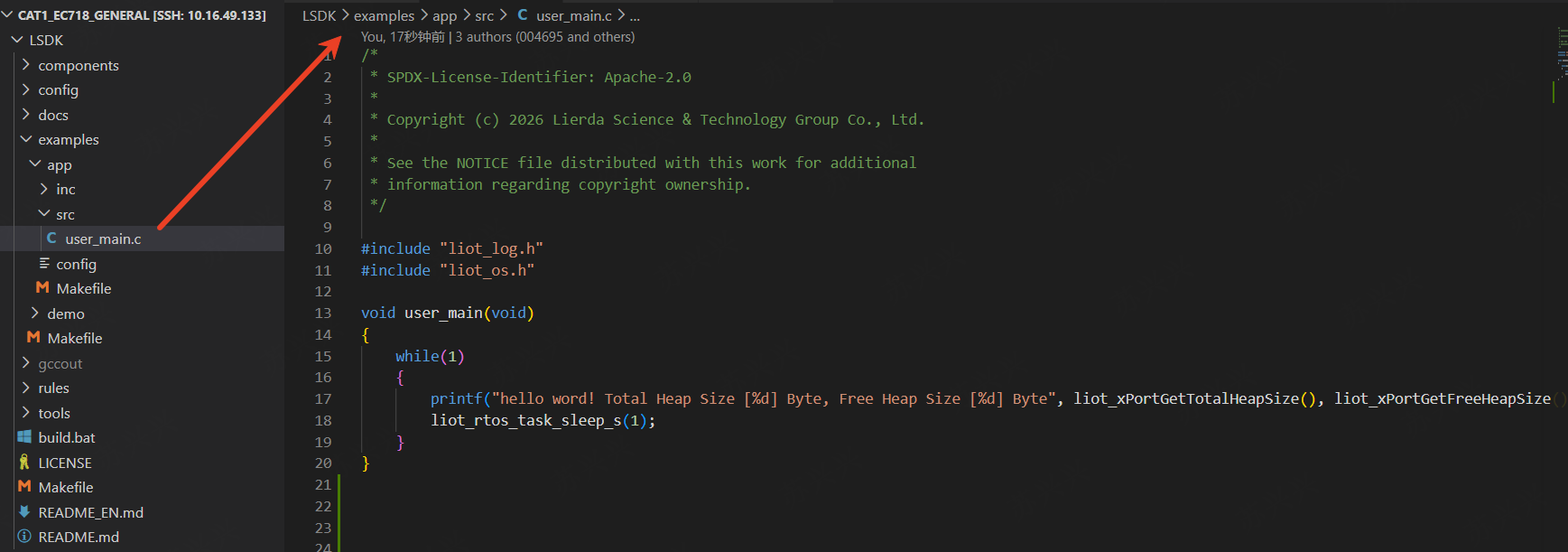
The app project only implements a function in user_main.c that prints current memory usage. Customers can copy the examples/app directory and rename it to quickly create their own project.
4.2 demo Project
The demo project is an API example project. Lierda provides rich example code scenarios for reference.
examples/demo is loaded and started via void user_main(void) in demo_main.c.
4.2.1 Compiling the demo Project
Modify the root
Makefileand setPROJECTto demo.In the
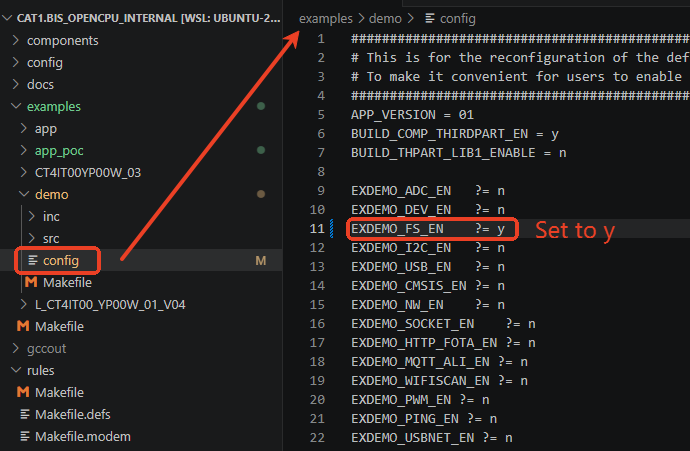
examples/demo/configfile, set the demo you want to test toy, then compile normally.
4.2.2 How Config Maps to Demos
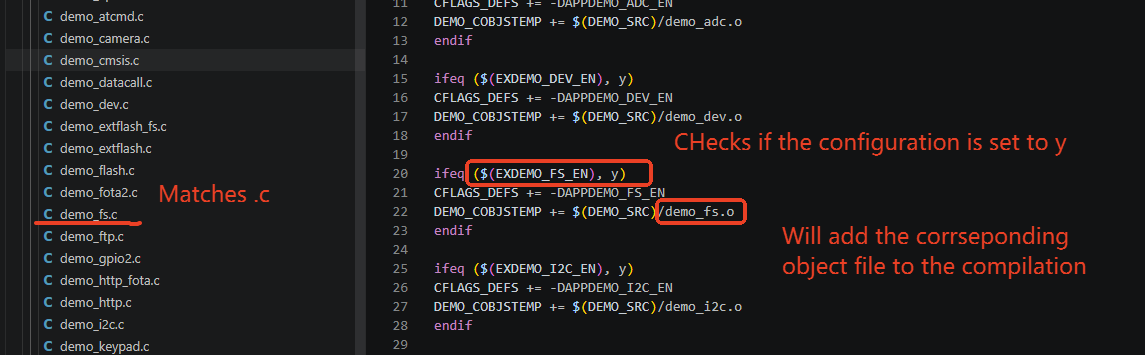
All demos are located in LSDK/examples/demo/src.
Variables in the config file follow Makefile rules. Taking EXDEMO_FS_EN as an example, set it to y in the config file.
In LSDK/examples/demo/Makefile, the corresponding demo_fs.c file is compiled based on the EXDEMO_FS_EN variable.
5 Adding Your Own Project
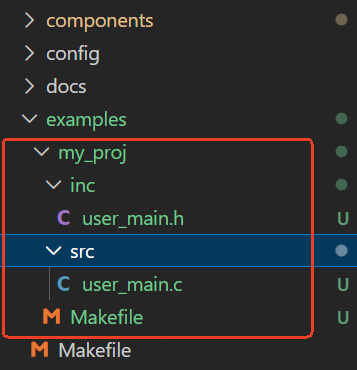
The examples/ directory is the SDK’s default location for storing projects. Create your own project under examples/ by referencing the app project. Recommended: copy the app directory to the same level and rename it.
Modify the root Makefile and set PROJECT to your project name.
Notes:
The entry function must be:
void user_main(void).The project root must contain a Makefile for internal compilation rules.
6 Quick Start with the SDK
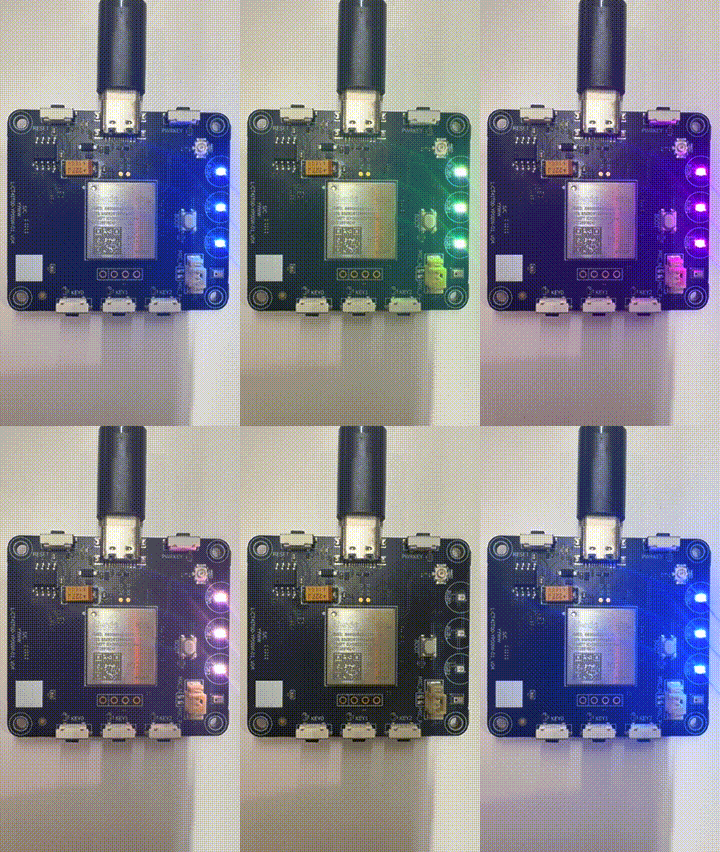
We provide a simple LED tutorial to help users quickly get started with the SDK: 30-Minute Quick Start.
7 Command Line Development Guide
For Linux and Windows systems, we provide a command-line development guide for quick integration with AI tools and CLI workflows.