Low Power Mode Usage Guide_Rev1.0
Document Revision History
Document Version |
Revision Date |
Revised By |
Reviewed By |
Changes |
|---|---|---|---|---|
Rev1.0 |
26-01-21 |
zlc |
Initial release |
1 Introduction
This chapter mainly introduces the newly added low power API interfaces and related usage instructions, providing reference for customers when implementing low power functionality using OPENSDK.
Peripheral power-down status in sleep mode
| Power Mode | LIOT_SLEEP_MODE_NORMAL | LIOT_SLEEP_MODE_LOW | LIOT_SLEEP_MODE_DEEP_LOW | |
|---|---|---|---|---|
| Description | Normal working mode, milliampere-level power consumption, suitable for scenarios without strict power requirements | Microampere-level power consumption, fast wake-up, suitable for frequent sleep/wake scenarios | Lower power consumption mode, suitable for long-term sleep, while maintaining necessary network connections |
|
| CPU Frequency | Normal | Reduced | Sleep | |
| RAM Status | Retained | Retained | Power-off | |
| Peripherals | General GPIO | Available | Not available | Not available |
| AON GPIO | Available | Available | Available | |
| APWM | Available | Available | Available | |
| Peripheral Status (I2C/SPI/I2S/PWM/ADC/UART/CAN) | Available | Not available | Not available | |
| VDD_EXT | Output maintained | Output supported on some models | Output supported on some models | |
| Wake-up Methods | wakeup/pwrkey | Available | Available | Available |
| Software Timer | Supported | Supported | Not supported | |
| Low Power Timer | Supported | Supported | Supported | |
| Low Power UART | Supported | Supported | Supported | |
| Data, SMS | Supported | Supported | Supported | |
| Data Communication | Application Protocol | FTP(S)/MQTT(S) HTTP(S)/WebSocket LWM2M/COAP TCP/TCP(S)/UDP(S) | FTP(S)/MQTT(S) HTTP(S)/WebSocket LWM2M/COAP TCP/TCP(S)/UDP(S) | LWM2M/COAP TCP/UDP |
| Downlink Paging | Supported | Supported | Supported |
The approximate current ranges for different power modes are:
Power Mode |
Non-paging Current |
|---|---|
|
~4mA |
|
~60uA |
|
~9.5uA |
2 API Function Overview
Function |
Description |
|---|---|
|
Set power mode |
|
Start low power timer |
|
Stop low power timer |
|
Check if low power timer is running |
|
Get low power timer ID that woke up the system |
3 Type Definitions
3.1 liot_sleep_mode_type_e
Power mode type enumeration.
Declaration
typedef enum {
    LIOT_SLEEP_MODE_NORMAL,      // normal mode
    LIOT_SLEEP_MODE_LOW,         // sleep mode
    LIOT_SLEEP_MODE_DEEP_LOW,    // deep sleep mode
}liot_sleep_mode_type_e;
Parameters
LIOT_SLEEP_MODE_NORMAL: Normal working modeLIOT_SLEEP_MODE_LOW: Low power modeLIOT_SLEEP_MODE_DEEP_LOW: Ultra-low power mode
Note:
In LIOT_SLEEP_MODE_LOW and LIOT_SLEEP_MODE_DEEP_LOW modes, peripherals will be powered off. To enter these modes, you need to: 1. Disable software timers, 2. Suspend all non-blocking tasks, 3. Disable peripheral drivers.
In LIOT_SLEEP_MODE_LOW mode, RAM is not powered off. Applications need to suspend all tasks. If timers are created, they will wake up the system after timeout. If tasks are in non-blocking state, they will also wake up the system when timeout occurs. It is recommended to change the wait time to forever.
In LIOT_SLEEP_MODE_DEEP_LOW mode, RAM is powered off. After the system wakes up, the code runs as if restarting. You need to check the wake-up reason at the beginning of the application. If low power timers are used, you can query the specific hardware timer ID that woke up the system using the Liot_SleepTimerGetID() interface. In this mode, 1 TCP and 1 UDP connection can be maintained. The TCP link state will be backed up and restored by the system, so no additional processing is required at the application layer. The heartbeat interval with the server should not be too short, otherwise it will cause frequent system wake-ups. It should also not exceed the IP aging time, generally within 10 minutes. If the aging time expires, the module needs to re-attach to the network, which will cause a power surge.
3.2 LiotSleepModeCfg_t
Power mode configuration structure.
Declaration
typedef struct {
    liot_sleep_mode_type_e mode;    //sleep mode
} LiotSleepModeCfg_t;
Parameters
Type |
Parameter |
Description |
|---|---|---|
liot_sleep_mode_type_e |
mode |
Power mode |
3.3 Liot_SleepTimerID_e
Low power timer enumeration options.
Declaration
typedef enum {
    LIOT_DEEPSLP_TIMER_ID0 = 0,		// num 0/1: 2 AONTimer, without flash storage, 2.5 hour in 100Hz
	LIOT_DEEPSLP_TIMER_ID1,
	LIOT_DEEPSLP_TIMER_ID2,
	LIOT_DEEPSLP_TIMER_ID3,
	LIOT_DEEPSLP_TIMER_ID4,
	LIOT_DEEPSLP_TIMER_ID5,
    LIOT_DEEPSLP_TIMER_MAX_NUM,
}Liot_SleepTimerID_e;
Parameters
LIOT_DEEPSLP_TIMER_ID0: Low power timer ID 0LIOT_DEEPSLP_TIMER_ID1: Low power timer ID 1LIOT_DEEPSLP_TIMER_ID2: Low power timer ID 2LIOT_DEEPSLP_TIMER_ID3: Low power timer ID 3LIOT_DEEPSLP_TIMER_ID4: Low power timer ID 4LIOT_DEEPSLP_TIMER_ID5: Low power timer ID 5
Description
LIOT_DEEPSLP_TIMER_ID0andLIOT_DEEPSLP_TIMER_ID1are AON timers. These timers become invalid after system reset. Maximum timeout is 2.5 hours, and these 2 timers do NOT write to FLASH.LIOT_DEEPSLP_TIMER_ID2~LIOT_DEEPSLP_TIMER_ID5are deep sleep timers. Maximum timeout is 740 hours, and these timers write to FLASH. Pay attention when using them. These timers perform FLASH erase/write operations, and Flash has an erase/write lifecycle. If developers frequently start/stop these timers in loops, the module may be damaged within months. High-frequency (such as second-level) cyclic calls are strictly prohibited. They should only be used for long-period wake-up tasks.
3.4 liot_sleep_errcode_e
Low power interface error code enumeration options.
Declaration
typedef enum{
  LIOT_SLEEP_SUCCESS             = LIOT_SUCCESS,
  LIOT_SLEEP_INVALID_PARAM       = (LIOT_COMPONENT_PM_SLEEP << 16) | 1000,
  LIOT_SLEEP_LOCK_CREATE_FAIL    = (LIOT_COMPONENT_PM_SLEEP << 16) | 1001,
  LIOT_SLEEP_LOCK_DELETE_FAIL    = (LIOT_COMPONENT_PM_SLEEP << 16) | 1002,
  LIOT_SLEEP_LOCK_LOCK_FAIL      = (LIOT_COMPONENT_PM_SLEEP << 16) | 1003,
  LIOT_SLEEP_LOCK_UNLOCK_FAIL    = (LIOT_COMPONENT_PM_SLEEP << 16) | 1004,
  LIOT_SLEEP_LOCK_AUTOSLEEP_FAIL = (LIOT_COMPONENT_PM_SLEEP << 16) | 1005,
  LIOT_SLEEP_PARAM_SAVE_FAIL     = (LIOT_COMPONENT_PM_SLEEP << 16) | 1006,
} liot_sleep_errcode_e;
Parameters
LIOT_SLEEP_SUCCESS: Execution successfulLIOT_SLEEP_INVALID_PARAM: Invalid parameterLIOT_SLEEP_LOCK_CREATE_FAIL: Sleep handle creation failedLIOT_SLEEP_LOCK_DELETE_FAIL: Sleep handle deletion failedLIOT_SLEEP_LOCK_LOCK_FAIL: Sleep handle vote failedLIOT_SLEEP_LOCK_UNLOCK_FAIL: Sleep handle unvote failedLIOT_SLEEP_LOCK_AUTOSLEEP_FAIL: Setting automatic entry into sleep mode failedLIOT_SLEEP_PARAM_SAVE_FAIL: Saving parameters to NV failed
4 Detailed API Functions
4.1 DeepSlpTimerCb_Func
Low power function timeout callback function. Note: Time-consuming operations cannot be performed in this function.
Declaration
typedef void (*DeepSlpTimerCb_Func)(Liot_SleepTimerID_e timeid);
Parameters
timeid: [In] Low power timer ID, please refer to Section 3.3.
Return Value
void
4.2 Liot_SleepSetMode
This function is used to set the device sleep mode. After setting the sleep mode, it will not immediately enter low power mode. The system will internally perform a voting check, and only enters low power mode when all votes “allow”. The setting becomes invalid after system reset.
Declaration
liot_sleep_errcode_e Liot_SleepSetMode(LiotSleepModeCfg_t *cfg);
Parameters
cfg: [In] Sleep mode configuration.
Return Value
liot_sleep_errcode_e: Execution result code, please refer to Section 3.4.
4.3 Liot_SleepTimerStart
This function is used to start the low power timer.
Declaration
liot_sleep_errcode_e Liot_SleepTimerStart(Liot_SleepTimerID_e timeid, uint32_t timeout, DeepSlpTimerCb_Func cb);
Parameters
timeid: [In] Low power timer ID, please refer to Section 3.3. If customers frequently call timers that write to Flash (ID2-5), it will cause hardware damage.timeout: [In] Low power timer timeout value. Different timer IDs have different maximum times that can be set. Please choose according to your business requirements, please refer to Section 3.3.cb: [In] Low power timer timeout callback function, please refer to Section 4.1.
Return Value
liot_sleep_errcode_e: Execution result code, please refer to Section 3.4.
4.4 Liot_SleepTimerStop
This function is used to stop the low power timer.
The low power timer will automatically delete after timeout. To restart it, you need to call Start again.
Declaration
liot_sleep_errcode_e Liot_SleepTimerStop(Liot_SleepTimerID_e timeid);
Parameters
timeid: [In] Low power timer ID, please refer to Section 3.3.
Return Value
liot_sleep_errcode_e: Execution result code, please refer to Section 3.4.
4.5 Liot_SleepTimerCheck
This function is used to check if the low power timer is running.
Declaration
bool Liot_SleepTimerCheck(Liot_SleepTimerID_e timeid);
Parameters
timeid: [In] Low power timer ID, please refer to Section 3.3.
Return Value
bool: true - Low power timer is running, false - Low power timer is not running.
4.6 Liot_SleepTimerGetID
This function is used to get the timer ID that woke up the system.
Mainly used in LIOT_SLEEP_MODE_DEEP_LOW sleep mode to query the low power timer ID that woke up the system after wake-up. It has no effect in normal mode.
Declaration
Liot_SleepTimerID_e Liot_SleepTimerGetID(void);
Parameters
void
Return Value
Liot_SleepTimerID_e: Timer ID that woke up the system.
5 Code Examples
Example code reference: LSDK/example/src/demo_sleepex.c.
Running Results:
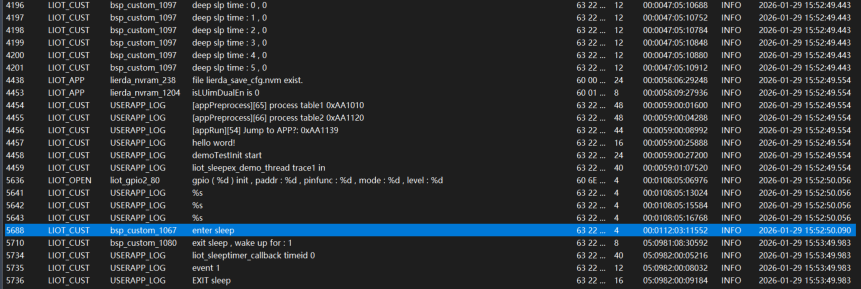
Test log for entering LIOT_SLEEP_MODE_LOW
According to the demo, first enter LIOT_SLEEP_MODE_LOW low power mode, then start a 1-minute low power timer. After wake-up, the system checks if it was woken up by the low power timer, then exits the sleep low power mode.
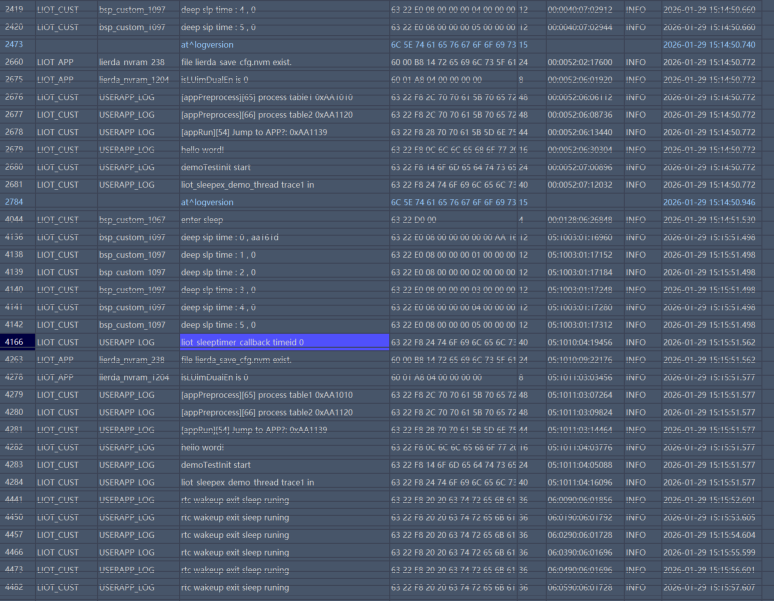
Test log for entering LIOT_SLEEP_MODE_DEEP_LOW
According to the demo, first enter LIOT_SLEEP_MODE_DEEP_LOW low power mode, then start a 1-minute low power timer. After wake-up, the system checks if it was woken up by the low power timer, then exits the sleep low power mode.
6 FAQ
For
LIOT_SLEEP_MODE_DEEP_LOWmode, when the system enters this mode, RAM will be powered off, and global variables will be cleared to zero after system wake-up. If you need to save critical data, it is recommended to use the file system for storage, and restore the variables after system wake-up.